ArticleBy Rafał Czarnecki5 min read
TikTok-style captions: how to choose the style, size and colour
In short
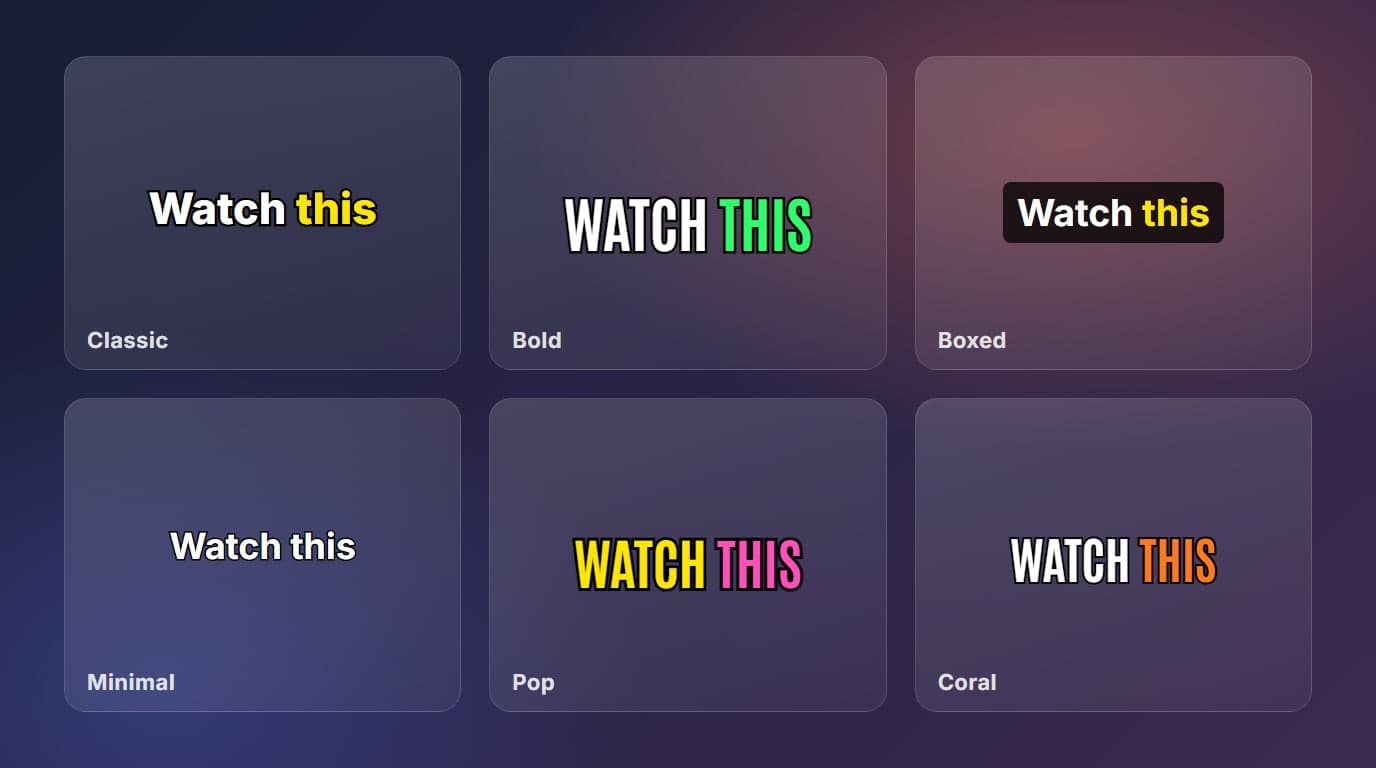
- 6 styles: Classic, Bold, Boxed, Minimal, Pop and Coral.
- Size slider from 0,5× to 2×, or pinch with two fingers on a phone. The editor keeps the longest word inside the frame.
- 9 colours for the text and for the highlighted spoken word, plus ALL CAPS and a pop of 15% on each word.
- Tap key words, such as the product name, to highlight them for the whole caption.
- Same price as plain captions: 5 credits per started minute, and recognising the speech is free.
Contents
Short videos with big, word-by-word captions are everywhere, and the look is easy to copy. In Fattly’s captions tool you set it up in one editor: pick a style, drag the captions where you want them, choose the colours and mark the words that matter. If you have not made captions before, start with how to add captions to a video automatically.
The 6 styles
| Style | The look | Suits |
|---|---|---|
| Classic | White bold text, black outline, the spoken word in yellow, about 3 words at a time | Talking heads, explainers |
| Bold | Very large condensed letters, the spoken word in green, 2 words at a time | Hooks and short punchy clips |
| Boxed | White text on a dark box, no outline, about 3 words at a time | Busy or bright backgrounds |
| Minimal | Small white text with a thin outline, up to 6 words at a time | Calm tutorials, longer sentences |
| Pop | Large yellow text, thick outline, the spoken word in pink, 2 words at a time | Playful, high-energy clips |
| Coral | White condensed text, the spoken word in orange, about 3 words at a time | A warm, brand-like feel |
How to choose a style
- Match the energy of the clip. A calm tutorial in a huge pink caption feels off, and so does a fast hook in tiny grey text.
- Think about the background first. If the picture is busy or bright, the Boxed style stays readable where outlined text can get lost.
- Fewer words per caption means faster reading. If viewers must read a lot at once, they stop watching the speaker.
- Pick one style per series of videos. A consistent look is recognised faster than a clever one.
Size and position
Drag a caption with your finger or the mouse to any spot in the frame. Change the size with the slider, from 0,5× to 2× of the default, or pinch with two fingers on a phone. The editor measures the longest word and does not let the caption grow past the edge of the picture. Keep the captions in the middle of the frame, away from the bottom edge, where platforms usually show their own description and buttons. The “Centre” button snaps a caption to the middle.
Colours, capitals and highlighted words
- Choose the text colour and the colour of the spoken word from 9 colours. High contrast with the picture matters more than a perfect palette.
- Switch on “CAPITALS” for a louder look. It works best with short captions.
- “Pop the spoken word” makes each word about 15% larger while it is being said, so the eye follows the speech.
- Tap a word in the list to highlight it for the whole caption, for example the product name or the price.
A quick checklist before you burn in
- Read the whole text and fix names, brands and numbers.
- Use “Split” on long captions and “Merge with next” on captions that are too short.
- Check that every caption is readable on both a light and a dark moment of the clip.
- Look at the clip on a phone, the way your audience will.
- Click burn in. The preview matches the result, so what you see is what you get.
If the captions are for an ad, see captions in video ads. For ads made from a single product photo, there is a full walkthrough in how to make an AI ad.
Frequently asked questions
Which caption style is best for TikTok?
There is no single best one. For short, punchy hooks the Bold and Pop styles fit, for a talking head the Classic style, for busy backgrounds Boxed. Try two on the same clip and keep the one that reads better on a phone.
Can I change the colours of the captions?
Yes. You choose the text colour and the colour of the spoken word from 9 colours, and you can switch on ALL CAPS.
Can I highlight the product name?
Yes. Tap a word in the caption list to highlight it for the whole caption, so a product name or a price stands out.
Will the preview match the final video?
The editor shows the captions on your clip the way they are burned in, with the same size, position and style.
Does a fancier style cost more?
No. Every style costs the same: 5 credits per started minute of video. Recognising the speech is free.
Ready to try?
Style your captions