GuideBy Rafał CzarneckiUpdated 8 min read
How to generate an AI image: prompts, models and costs, step by step
In short
A good AI image takes one well-written sentence and usually a few seconds. Here is what goes into a prompt, five prompts you can copy, which model to pick and what it costs, how to rework your own photo and what 10 free credits actually cover.
Contents
- What you get and what it costs
- 1. Write the prompt: subject, setting, light, style, framing
- Five prompts to copy
- 2. Choose the aspect ratio and the number of images
- 3. Pick a model: cheap for drafts, better for the final
- 4. Generate, review and change one thing at a time
- Generate an image from a photo: the Edit photo tab
- Common mistakes
- Can you use AI images commercially?
- Summary
This guide is for anyone who needs a specific image: a product photo, a poster, a social post or an illustration for an article. It walks through the Fattly AI image generator: writing the prompt, picking a model, budgeting your credits and reworking a photo you already have.
What you get and what it costs
- An image from a text description in one of 6 aspect ratios (1:1, 16:9, 9:16, 4:3, 3:2, 2:3), 1 to 4 versions at a time.
- 16 models that create images from text and 3 that edit your photo. An image costs 1 to 15 credits, an edit 4 to 20.
- The price is on the button before you click, e.g. “Generate · 7 cr”. Two or four images cost two or four times as much.
- If a generation fails, the credits come back automatically. A blank image in a batch is refunded too.
Signing up gives you 10 free credits, no card required. That is 10 images on the cheapest model, Z-Image Turbo (1 credit), or one image on the default Nano Banana 2.1 (7 credits) plus three 1-credit tries, or one GPT Image 2 image (9 credits). It won't cover Nano Banana Pro (15) or a photo edit with the Nano Banana edit models (11 and 20). The smallest pack is 150 credits, for example 21 Nano Banana 2.1 images. Credits don't expire, a subscription is optional, and current prices are on the pricing page.
1. Write the prompt: subject, setting, light, style, framing
A prompt describes what should be in the image. A good one answers five questions: what is in it, where it is, how it is lit, what style it is in and how close we are. Full sentences and comma-separated lists both work.
- Subject: not “a dog” but “a ginger corgi sitting on grass”. Give colors, materials, numbers.
- Setting: “on a wooden kitchen table”, “on a plain beige background”, “on a rainy street”.
- Light: “soft window light”, “golden hour”, “studio light from the side”. Light sets the mood more than anything else.
- Style: “photograph”, “flat illustration”, “3D render”, “watercolor”. Leave it out and the model guesses.
- Framing: “close-up”, “top-down view”, “from the shoulders up”. Need room for text? Add “empty space on the right”.
In practice, “dog” gets you a random picture. “Photo of a ginger corgi in a meadow, golden hour, backlit, blurred background, shot at the dog's eye level” is much closer to what you have in mind, and it costs the same.
Only have a rough idea? Type a few words and click “Enhance prompt”: the AI expands them into a detailed description for free. You can also write in Spanish, German or another language; Fattly translates the prompt into English before generating, and text in double quotes stays exactly as typed. The generator is safe-for-work only, and a prompt that breaks the rules is blocked before any credits are taken.
Five prompts to copy
Copy the text after the colon and swap in your own product, colors and wording. The brackets give a model and an aspect ratio to start with.
- Product photo (Seedream 5.0 Pro, 6 credits, 1:1): product photo of a glass bottle of olive oil on a light stone countertop, an olive branch and a few olives beside it, soft daylight from the left, gentle shadow, sand-colored background, clean advertising style, front view, empty space on the right.
- Poster with a headline (GPT Image 2, 9 credits, 2:3): event poster in a flat illustration style, large bold headline “NIGHT MARKET” at the top, a smaller line “Fridays 6-11 pm” below it, food stalls with string lights, deep navy sky, warm yellow and red accents, bold sans-serif typography.
- Logo-style mark (Ideogram 4.0, 7 credits, 1:1): minimal logo for an artisan bakery, the word “GRAIN” in bold rounded letters, a simple wheat-ear symbol above it, two colors: dark brown and gold, flat vector style, white background, no shadows, no 3D effects.
- Portrait for an article or a deck (Nano Banana 2.1, 7 credits, 2:3): portrait of a woman in her thirties in a bright office, soft window light from the side, slight smile, navy blazer, blurred background, professional headshot style, framed from the shoulders up.
- Social media post (drafts on Z-Image Turbo for 1 credit, final on Nano Banana 2.1, 1:1): social media graphic, a cup of coffee and a croissant on a pastel pink background, top-down view, plenty of empty space in the center, soft shadows, minimalist style.
On-image text goes in double quotes and stays short. Most models manage a word or two of plain English; for posters and logos, GPT Image 2 renders text best and Ideogram 4.0 is built for exactly that job. Accented letters such as é, ñ or ü are harder: if the selected model tends to garble them, the generator shows a warning with a one-click switch to GPT Image 2. For a true vector logo (SVG), choose Recraft V3 with a style from the vector group, at double the rate: 8 credits.
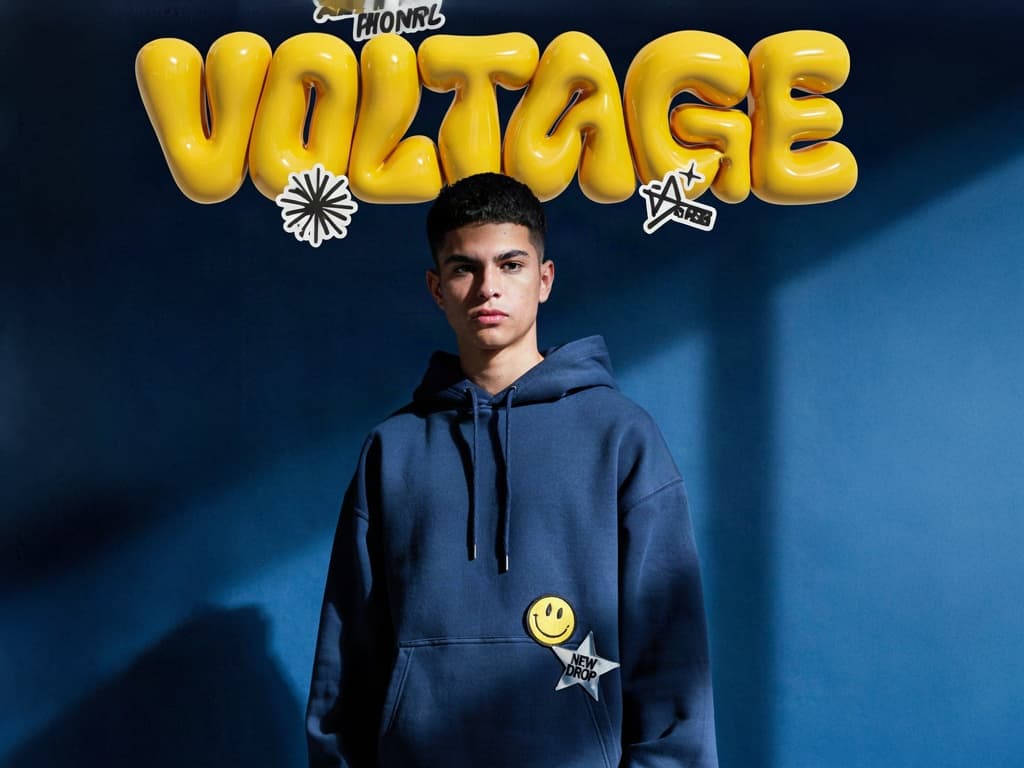
This poster shows the rule at work: the big VOLTAGE came out clean, while the tiny text on two of the stickers is gibberish. The shorter and larger the text, the better its chances.
2. Choose the aspect ratio and the number of images
Set the ratio before you generate, because it shapes the whole composition, not just the crop: 1:1 for the feed and store listings, 9:16 for Stories, Reels and TikTok, 16:9 for banners and YouTube thumbnails, 4:3 and 3:2 for a classic landscape photo, 2:3 for posters and portraits.
You can make 1, 2 or 4 images at once, each at the model's price: 4 Nano Banana 2.1 images cost 28 credits. While you are still hunting for the idea, 4 images on a cheap model beat 1 on an expensive one.
3. Pick a model: cheap for drafts, better for the final
Every model shows its price per image, “Cheapest first” sorts the list from 1 credit up, and you can filter by maker, such as Google or OpenAI. Nano Banana 2.1 (7 credits) is selected by default. All 16 text-to-image models:
| Model | Cost per image | Good for |
|---|---|---|
| Z-Image Turbo | 1 credit | The fastest, cheapest prompt tests |
| Z-Image | 2 credits | Cheap, more detail than Turbo |
| Nano Banana 2 Lite | 3 credits | Quick, cheap variations |
| Grok Imagine | 3 credits | Bold, imaginative scenes |
| Recraft V4, Recraft V3 | 4 credits | Logos, vector-style art, design with text |
| Seedream 5.0 Lite | 4 credits | Fast photorealism |
| Qwen Image 3.0 | 4 credits | Strong detail and prompt following |
| Krea V2 Large | 4 credits | Aesthetic, art-directed shots |
| FLUX.2 [pro] | 5 credits | Flagship FLUX, very faithful to the prompt |
| SD 3.5 Large | 6 credits | Versatile open-source model |
| Seedream 5.0 Pro | 6 credits | Flagship photorealism |
| Nano Banana 2.1 | 7 credits | The default: vivid colors, strong text |
| Ideogram 4.0 | 7 credits | Posters and logos with sharp text |
| GPT Image 2 | 9 credits | Closest to the prompt, best text rendering |
| Nano Banana Pro | 15 credits | Complex scenes, infographics |
Nano Banana 2.1 and Nano Banana Pro are Google's Gemini image models, GPT Image 2 is from OpenAI, Seedream from ByteDance and Grok Imagine from xAI. Looking for a Google or Gemini AI image generator? Start with the first two.
4. Generate, review and change one thing at a time
Click “Generate”. An image is usually ready in seconds; premium models take longer. If something is off, don't rewrite the whole prompt. Change one element, like the light or the framing, and generate again, so you know what made the difference.
Images stay in your history for 30 days and are then deleted automatically, so download what you want to keep. From the history, “Recreate” reopens the generator with the same model and prompt, and “Turn into video” animates the image as a separate, paid generation.
Generate an image from a photo: the Edit photo tab
To rework a photo you already have, switch to the “Edit photo” tab. Upload a JPG, PNG or WebP file (up to 10 MB), describe the change and choose one of three models:
- Recraft V3 Restyle (4 credits): turns the photo into an illustration or a graphic. The “Restyle strength” slider sets how far the result moves from the original.
- Nano Banana 2.1 Edit (11 credits): fast, faithful edits such as a new background or a different jacket color, with faces kept intact.
- Nano Banana Pro Edit (20 credits): the best preservation of faces and detail. The tab opens with this model selected, so on free credits switch to Recraft V3 Restyle.
The Nano Banana edit models take up to 4 photos: photo #1 is the person to keep, photo #2 the scene to place them in. Use only your own photos or photos of people who have agreed. Face swapping has its own Face Swap tab (14 credits), where you confirm you have the right to use the likeness.
A sample instruction: “Change the background to a bright studio with soft light, keep the product unchanged.” Two things differ from creating: the instruction goes to the model exactly as written, without translation, and the result keeps the proportions of your photo, whatever ratio you select.
Common mistakes
- A prompt that is too short. “Cat in space” leaves every decision to the model. Add the light, style and framing.
- Long on-image text, or text without quotes. Keep it to a few words, in double quotes.
- Changing the ratio afterwards. A square cropped to 9:16 loses almost half of its composition.
- Four images on an expensive model straight away. Four Nano Banana Pro images cost 60 credits; refine the prompt on a 1–3 credit model first.
- Real people and other companies' brands. Our Terms prohibit infringing anyone's likeness or trademarks.
Can you use AI images commercially?
Yes. Our Terms let you use generated images for any purpose, including commercial use, within the law and the model providers' terms, and Fattly claims no rights to them. AI images may not be protected by copyright and can resemble other people's results, so there is no guarantee of exclusivity. The image has no visible watermark, but its metadata records that it was made with AI, and removing that marking to hide the image's origin is prohibited.
Summary
A good AI image comes down to five parts of a prompt, a ratio set in advance and a model matched to the job. Test the idea for 1 to 3 credits, make the final on Seedream 5.0 Pro, Nano Banana 2.1 or GPT Image 2, and keep on-image text short and in quotes.
Frequently asked questions
Is Fattly's AI image generator free?
To start, yes, within limits. The 10 free credits you get at sign-up, with no card, cover up to 10 images on the cheapest model (1 credit each) or one image on the default Nano Banana 2.1 (7 credits). Prompt enhancement is always free. There is no unlimited free tier: after that you need a credit pack, and credits don't expire.
Can I use the AI image generator without signing up?
No. Generating requires an account with a confirmed email address, which protects the tool from abuse. You get 10 free credits when you sign up.
How do I generate an AI image from text?
Describe the image in the prompt box (subject, setting, light, style, framing), pick a model and an aspect ratio, and click “Generate”. The price is on the button, and the image is usually ready in seconds.
Can I generate an AI image from an image?
Yes. In the “Edit photo” tab, upload your photo and describe the change, such as a new background or a different style. The models are Recraft V3 Restyle (4 credits), Nano Banana 2.1 Edit (11) and Nano Banana Pro Edit (20). 10 free credits cover two Recraft restyles.
Does it work online, including on a phone?
Yes. It runs in the browser on a computer or a phone, with nothing to install. You download the image right away, and it stays in your account history for 30 days.
Can I use Google's Gemini image models?
Yes. Nano Banana 2.1 (7 credits, the default) and Nano Banana Pro (15 credits) are Google's Gemini image models. They sit in the same list as GPT Image 2 from OpenAI and 13 other models, each with its price shown.
Can I use AI images commercially?
Yes, within the law and our Terms, for example in a store, an ad or on a website. Don't generate real people without their consent or other companies' trademarks. AI images come with no guarantee of exclusivity.
Ready to try?
Generate an AI image in Fattly